hdds_viewer Network Analyzer
hdds_viewer is a military-grade observability tool for DDS/RTPS networks. It provides real-time capture, ML-powered anomaly detection, and visual debugging for robotics, defense, automotive, and medical applications.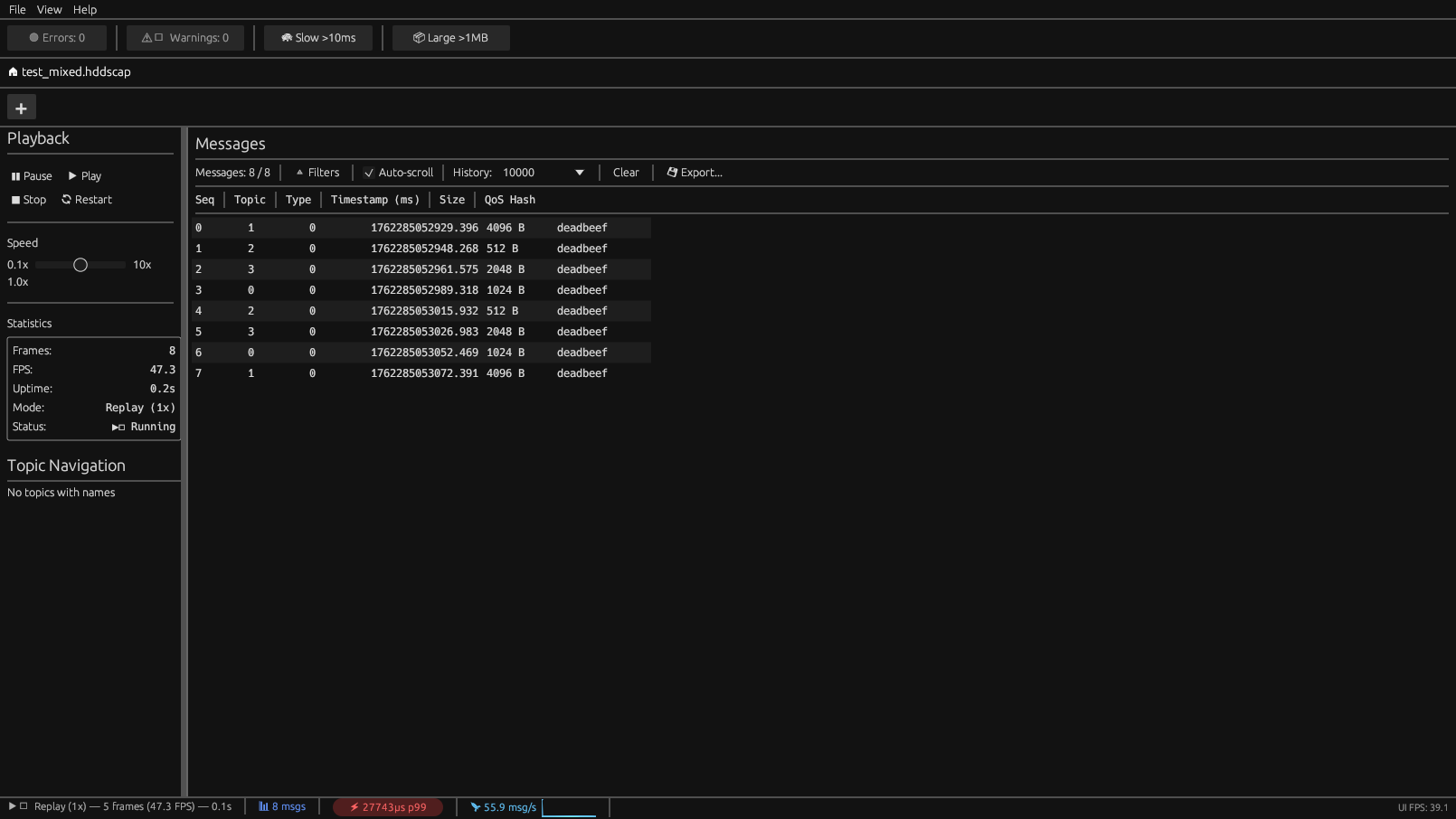
Key Features
Core Functionality
- Offline replay from
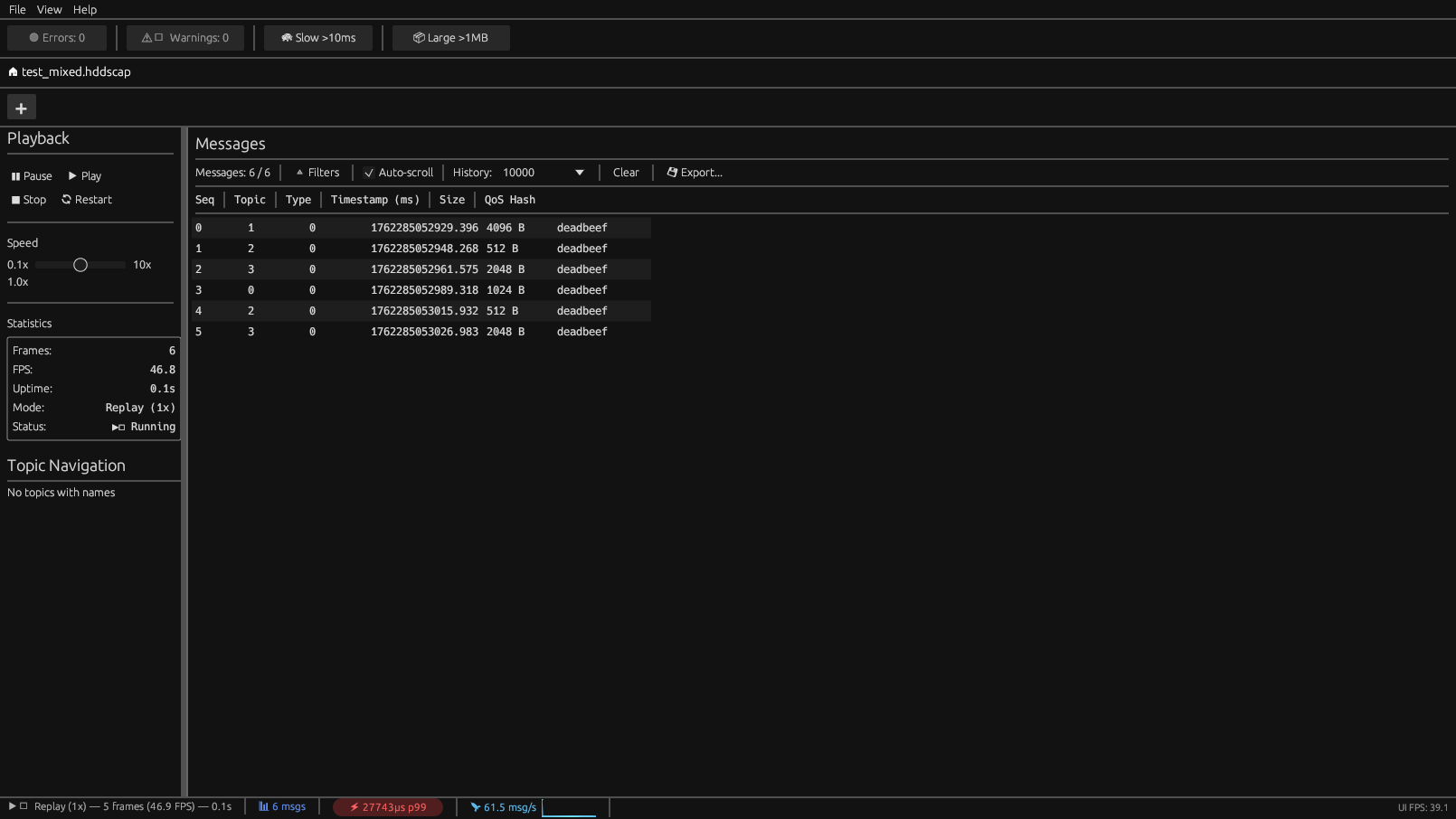
.hddscapcapture files (625 MB/s I/O throughput) - PCAP import - Analyze existing network captures
- Message inspection with CDR2 decoding (14 primitive types)
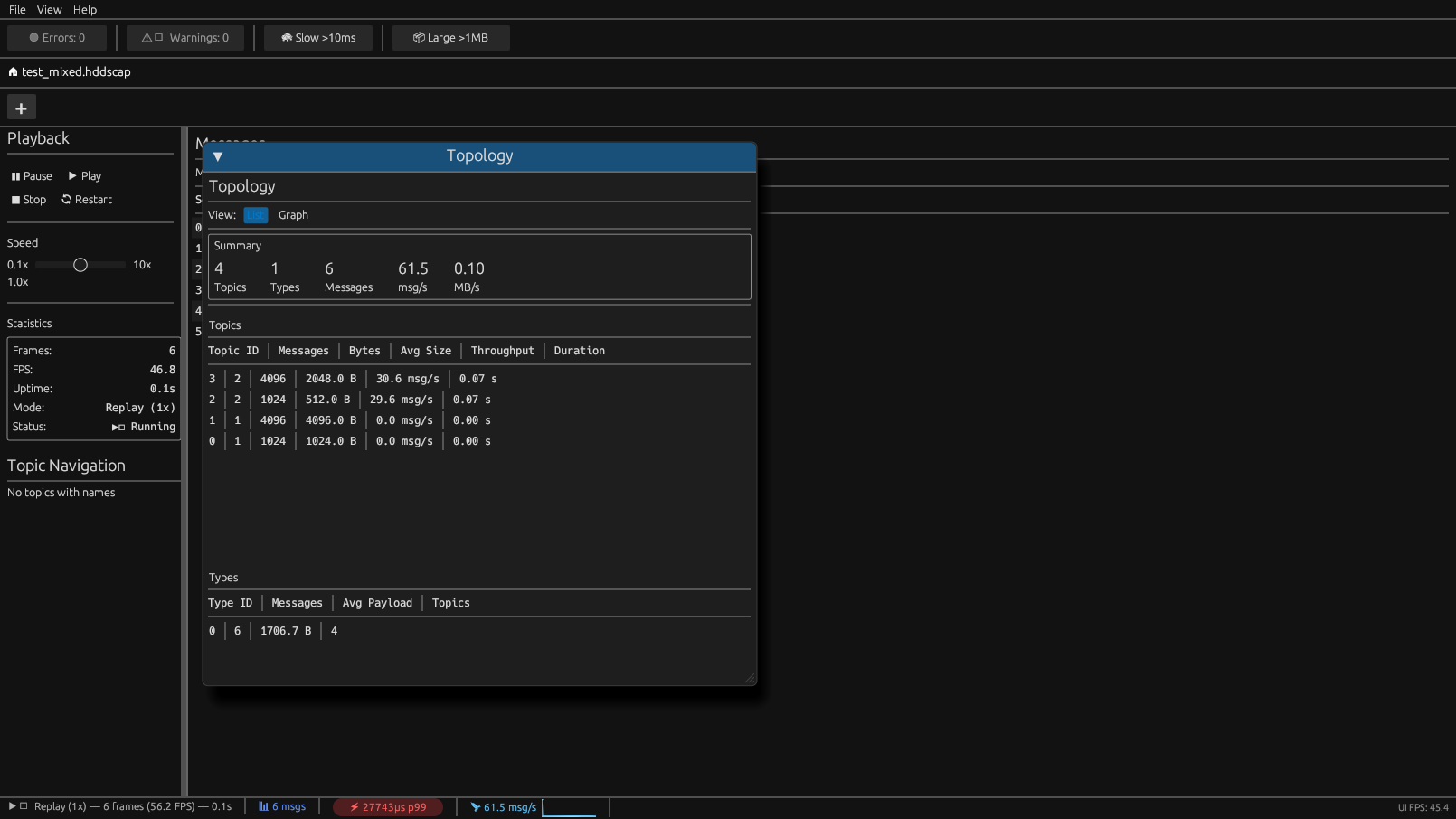
- Topology visualization (force-directed graph + list views)
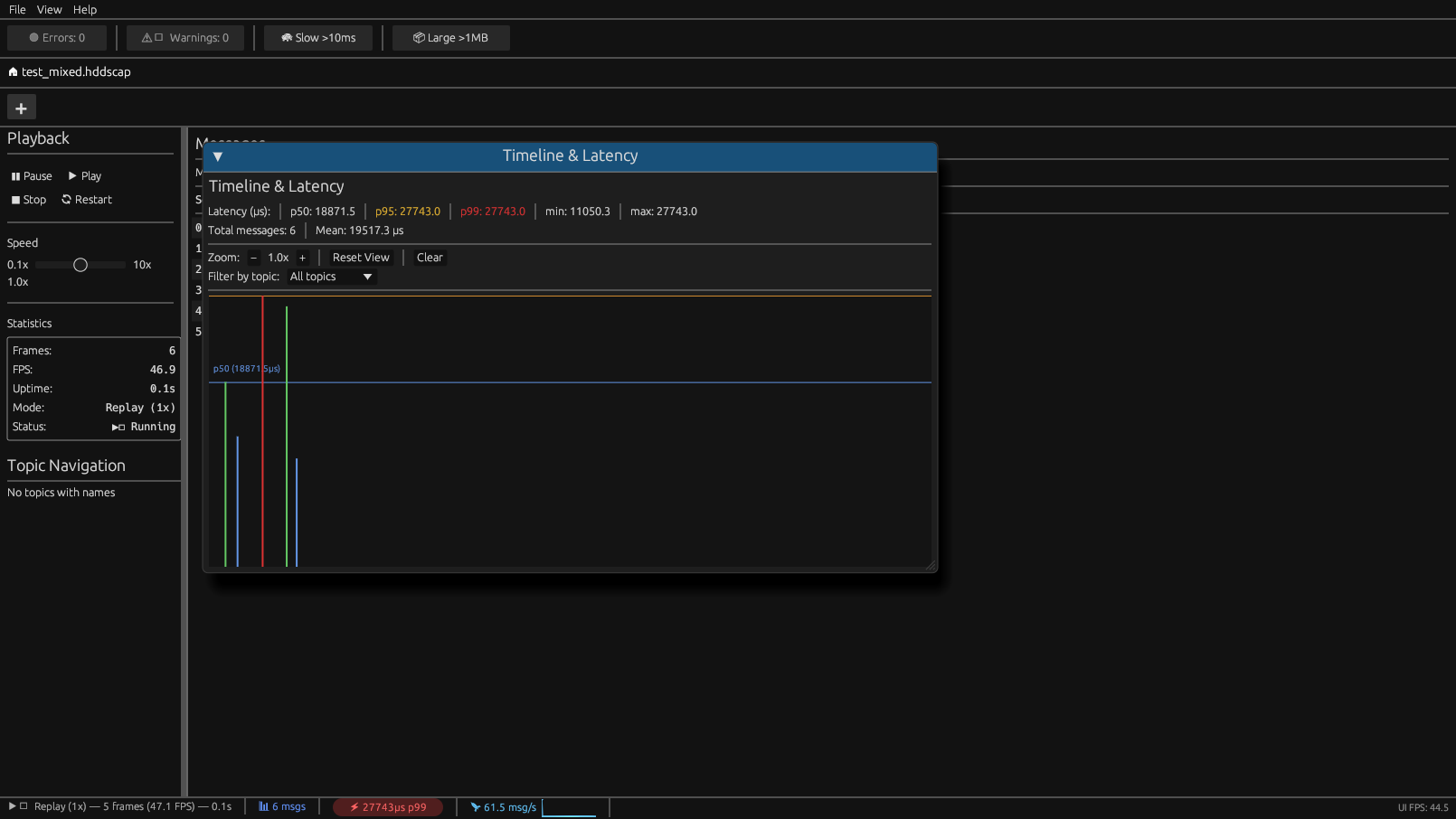
- Timeline analysis - Latency tracking with p50/p95/p99 percentiles
Intelligence
- QoS Advisor - 15 automated DDS misconfiguration detection rules
- AI Assistant - 15 pattern detectors for anomaly detection with suggested fixes
- ML Detection - ONNX-powered inference with 99.58% accuracy
User Experience
- 8 themes - Dark Pro, Cyberpunk, High Contrast (WCAG AAA), Catppuccin variants, Gruvbox
- 5 languages - English, French, German, Italian, Japanese (auto-detect)
- Plugin API - Extend with custom analyzers (Enterprise)
- Multi-format export - JSON, CSV, YAML, Markdown
Quick Start
# Install via cargo
cargo install hdds-viewer

Open a capture file (GUI mode)
hdds-viewer capture.hddscap

Headless analysis with JSON output
hdds-viewer --analyze capture.hddscap --format json

Run with ML-powered detection
hdds-viewer --analyze capture.hddscap --ml-detect
Architecture
hdds_viewer is built as a Rust workspace with multiple crates:
| Crate | Purpose |
viewer-core | Capture I/O, CDR decoding, topology, QoS analysis |
|---|---|
viewer-ui | egui/eframe GUI application |
viewer-ai | Pattern detectors (15 rules) and LLM integration |
viewer-ml | ONNX Runtime inference and feature extraction |
viewer-live | Live DDS capture via HDDS Telemetry TCP |
viewer-plugin | Plugin API for custom analyzers |
CLI Options
hdds-viewer [OPTIONS] [FILE]

Arguments:
  [FILE]  Path to .hddscap or .pcap file to analyze

Options:
  -a, --analyze          Run headless analysis (no GUI)
  -f, --format <FMT>     Output format: json, yaml, csv, text (default: text)
  --ml-detect            Enable ML-powered anomaly detection
  --ml-threshold <N>     Anomaly confidence threshold (default: 0.85)
  --ai                   Enable LLM-powered analysis (requires backend)
  --dump-features        Export ML features to CSV (for model training)
  --no-ml                Disable ML detection
  --no-network           Air-gapped mode (no external connections)
  -h, --help             Print help
  -V, --version          Print version
Exit Codes
| Code | Meaning |
| 0 | No issues detected |
|---|---|
| 1 | Low severity anomalies |
| 2 | Medium severity anomalies |
| 3 | High severity anomalies |
| 4 | Critical issues or file errors |
Capture Formats
| Format | Extension | Description |
| HDDSCAP | .hddscap | Native format, optimized for ML analysis |
|---|---|---|
| PCAP | .pcap, .pcapng | Wireshark-compatible network capture |
Detection Systems
hdds_viewer includes three complementary detection systems:
1. QoS Advisor (15 rules)
Detects DDS/RTPS misconfigurations:
| Category | Rules |
| Core QoS | Reliability, Durability, History, Deadline, Lifespan |
|---|---|
| Extended QoS | Ownership, Partition, Latency Budget, Transport Priority |
| Resources | Resource Limits, Liveliness, Content Filter |
See QoS Advisor documentation for details.
2. AI Assistant (15 pattern detectors)
Automated anomaly detection with suggested fixes:
| Severity | Detectors |
| Critical | Cascade failure, Resource exhaustion, Liveliness timeout |
|---|---|
| High | Deadline violation, Ownership conflict, Type mismatch |
| Medium | GC spikes, Partition mismatch, Presentation order |
| Low | Periodic patterns, Content filter efficiency |
See AI Assistant documentation for details.
3. ML Detection (ONNX)
Machine learning inference with ensemble model:
| Metric | Value |
| Accuracy | 99.58% |
|---|---|
| Inference latency | < 2ms per 100 frames |
| Features | 50+ statistical features |
See ML Detection documentation for details.
GUI Panels
| Panel | Purpose |
| Frame Table | Browse messages with filtering, sorting, export |
|---|---|
| Topology | Interactive force-directed graph + list view |
| Timeline | Latency analysis with p50/p95/p99 percentiles |
| QoS Advisor | Configuration issue detection with fixes |
| AI Assistant | Pattern-based anomaly detection |
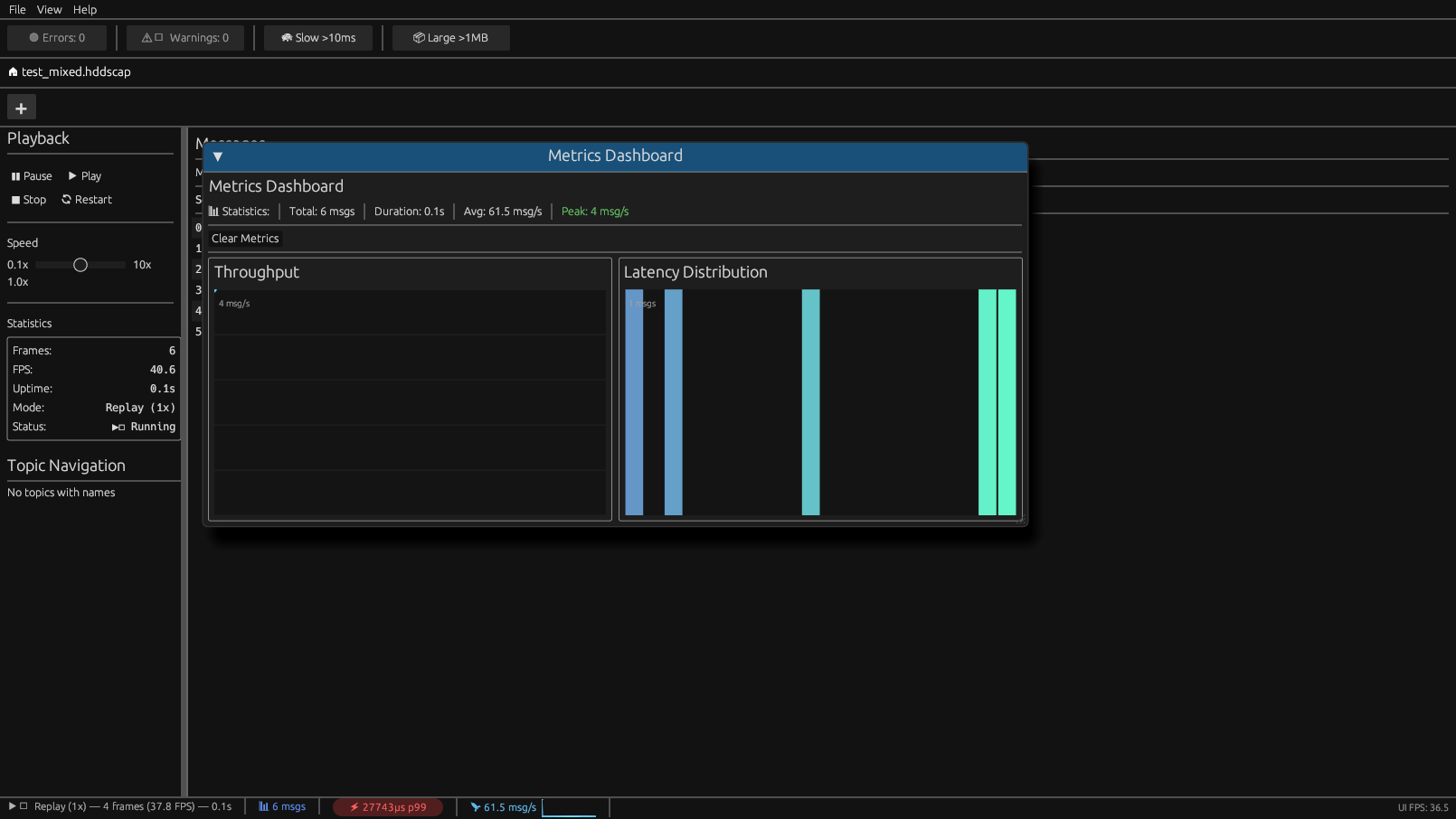
| Metrics | Throughput charts + latency histograms |
| Inspector | Payload hex/JSON/raw view |
| Recorder | Record new .hddscap captures |
Topology View
Timeline & Metrics
Message Inspector
Keyboard Shortcuts
| Shortcut | Action |
| Space | Play/Pause playback |
|---|---|
| Ctrl+O | Open capture file |
| Ctrl+R | Restart playback |
| Ctrl+Q | Open QoS Advisor |
| Ctrl+A | Open AI Assistant |
| Ctrl+, | Open Settings |
| Esc | Close dialog/window |
Performance
| Metric | Value |
| Write throughput | 625 MB/s |
|---|---|
| Read throughput | 800+ MB/s |
| RingBuffer ingestion | 41M msg/s |
| UI framerate | 60 FPS at all message rates |
| Binary size | 12 MB |
Adaptive Sampling
| Message Rate | Sampling |
| < 30k msg/s | Full (all frames) |
|---|---|
| 30k-60k msg/s | 1/2 (every 2nd frame) |
| 60k-100k msg/s | 1/4 (every 4th frame) |
| > 100k msg/s | 1/10 (every 10th frame) |
Configuration
Config File
Edit ~/.config/hdds-viewer/config.toml:
[default]
domain = 0
format = "pretty"

[appearance]
theme = "dark-pro"
language = "en"
ui_scale = 1.0

[ml]
enabled = true
anomaly_threshold = 0.85
model_path = "~/.config/hdds-viewer/models/"

[ai]
backend = "ollama"
model = "llama3.2"
base_url = "http://localhost:11434"
Environment Variables
HDDS_VIEWER_DOMAIN=0       # Default DDS domain
HDDS_VIEWER_THEME=cyberpunk # UI theme
HDDS_VIEWER_LANG=fr        # Language (en, fr, de, it, ja)
HDDS_VIEWER_LOG_LEVEL=debug # Log verbosity
System Requirements
| Requirement | Minimum |
| OS | Debian 11+, Ubuntu 20.04+ (glibc 2.31+) |
|---|---|
| Graphics | OpenGL 3.3+ or Vulkan |
| Memory | 512 MB (+ capture file size) |
| Disk | 50 MB (+ models ~5 MB) |
Quality Standards
hdds_viewer enforces military-grade quality (ANSSI/IGI-1300, Common Criteria EAL4+):
- Zero CRITICAL/HIGH audit violations
- All
unsafeblocks require// SAFETY:comments - No production panics outside tests
- 164 tests (126 unit + 23 integration + 12 doc + 3 tool)
License
- Community Edition: Free for personal/non-commercial use
- Pro/Enterprise: Commercial license with additional features
- Offline validation, no telemetry