AI Assistant
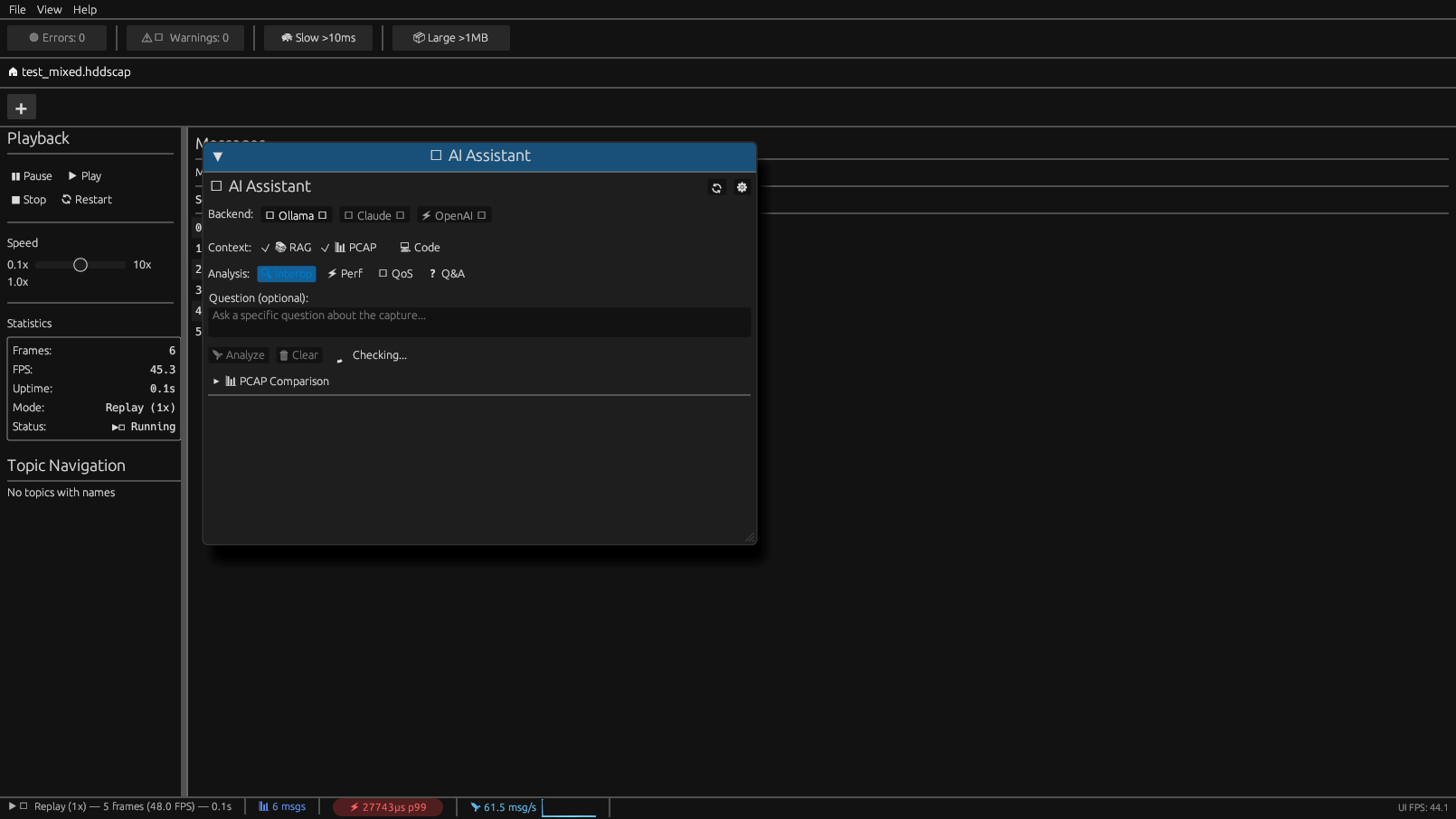
The AI Assistant provides intelligent anomaly detection and diagnostic analysis for DDS/RTPS traffic. It combines rule-based pattern detection with optional LLM-powered analysis.
Overview
Access the AI Assistant via View > AI Assistant or press Ctrl+A.
The assistant offers two modes:
| Mode | Description | Requirements |
| Pattern Detection | 15 hardcoded rules, no external dependencies | None (built-in) |
|---|---|---|
| LLM Analysis | Deep diagnostic with natural language | Ollama, Claude, or OpenAI |
Pattern Detectors (15 Rules)
Critical Severity
| Detector | Description |
| CascadeDetector | Downstream failures triggered by upstream issues |
|---|---|
| ResourcePredictor | Memory/CPU exhaustion prediction |
| LivelinessDetector | Writer liveliness lease expiration |
| ResourceLimitsDetector | Approaching max_samples or history limits |
High Severity
| Detector | Description |
| DeadlineDetector | DDS Deadline QoS violations |
|---|---|
| OwnershipDetector | EXCLUSIVE ownership conflicts |
| TypeConsistencyDetector | Payload size variance suggesting type mismatch |
| TransportPriorityDetector | Priority inversion in transport layer |
| LatencyBudgetDetector | End-to-end latency exceeds LatencyBudget QoS |
Medium Severity
| Detector | Description |
| GcDetector | Periodic latency spikes from garbage collection |
|---|---|
| PartitionDetector | Publisher/subscriber partition mismatch |
| PresentationDetector | Coherent updates received out of order |
| DestinationOrderDetector | Messages delivered out of order |
Low Severity
| Detector | Description |
| PeriodicDetector | Regular timing patterns (informational) |
|---|---|
| ContentFilterDetector | Inefficient content filter (>80% pass rate) |
Detection Results
Each detection includes:
pub struct Anomaly {
    pub pattern: String,        // e.g., "CascadeFailure"
    pub description: String,    // Human-readable explanation
    pub confidence: f64,        // 0.0 to 1.0
    pub severity: Severity,     // Critical, High, Medium, Low
    pub suggested_fix: Option<String>,
    pub timestamp_ns: u64,
}
LLM Backends (v0.3+)
For deeper analysis, the AI Assistant can query LLM backends.
Supported Backends
| Backend | Type | Air-Gapped | API Key Required |
| Ollama | Local | Yes | No |
|---|---|---|---|
| Claude CLI | Cloud | No | Yes (Anthropic) |
| OpenAI | Cloud | No | Yes (OpenAI) |
| Custom | Any | Configurable | Configurable |
Ollama Setup (Recommended)
# Install Ollama
curl -fsSL https://ollama.com/install.sh | sh

Pull a model
ollama pull llama3.2

Verify
ollama list
Configure in ~/.config/hdds-viewer/config.toml:
[ai]
backend = "ollama"
model = "llama3.2"
base_url = "http://localhost:11434"
Claude Setup
[ai]
backend = "claude"
model = "claude-3-5-sonnet-20241022"
api_key_env = "ANTHROPIC_API_KEY"  # Read from environment
OpenAI Setup
[ai]
backend = "openai"
model = "gpt-4o"
api_key_env = "OPENAI_API_KEY"
RAG (Retrieval-Augmented Generation)
The AI Assistant uses RAG to provide context-aware responses:
1. Vendor Knowledge Base - Indexed documentation from HDDS, FastDDS, RTI Connext
2. Code Context - AST-indexed source code via tree-sitter
3. Session History - Recent analysis results and patterns
RAG Store
[ai.rag]
enabled = true
store_path = "~/.config/hdds-viewer/rag.sqlite"
embedding_model = "nomic-embed-text"  # For Ollama
Prompt System
The AI Assistant uses Handlebars templates for unbiased prompts:
You are a DDS/RTPS protocol expert analyzing network traffic.
Context:
- Capture file: {{capture_file}}
- Duration: {{duration_seconds}}s
- Total samples: {{total_samples}}
Detected anomalies:
{{#each anomalies}}
- {{this.pattern}} ({{this.severity}}): {{this.description}}
{{/each}}
Analyze the root cause and provide actionable recommendations.
Templates are located in:
- Linux:
~/.config/hdds-viewer/prompts/ - macOS:
~/Library/Application Support/HDDS Viewer/prompts/
CLI Usage
# Run pattern detection only
hdds-viewer --analyze capture.hddscap

With LLM analysis (requires backend)
hdds-viewer --analyze capture.hddscap --ai

JSON output for CI/CD
hdds-viewer --analyze capture.hddscap --ai --format json
Causal Analysis
The AI Assistant builds a causal graph to identify root causes:
[Upstream Failure] → [Cascade Event] → [Downstream Impact]
         ↓
   [Root Cause Identified]
Access via Tools > Causal Graph or in the AI Assistant panel.
Response Caching
To reduce API calls, responses are cached:
[ai.cache]
enabled = true
ttl_seconds = 3600  # 1 hour
max_entries = 1000
Cache location:
- Linux:
~/.cache/hdds-viewer/ai-cache/
Best Practices
Offline-First
The AI Assistant works 100% offline with pattern detection. LLM backends are optional.
# Fully air-gapped usage
hdds-viewer --analyze capture.hddscap --no-network
Privacy
When using cloud backends (Claude, OpenAI):
- Only anonymized statistics are sent
- Payload contents are never transmitted
- Enable
dry_runto preview prompts without sending
[ai]
dry_run = true  # Preview prompts only
Exit Codes
| Code | Meaning |
| 0 | No anomalies detected |
|---|---|
| 1 | Low severity anomalies |
| 2 | Medium severity anomalies |
| 3 | High severity anomalies |
| 4 | Critical anomalies or errors |